Article
Linking and Virtual Memory
On this page 8
Linking and Virtual Memory
Introduction
After studying two semesters of computer systems, I’ve gained a deeper understanding of OS concepts and some elements of the C language.
Linking is a crucial concept in compiled languages. In Go/Rust, linking defaults to static linking, while C/C++ is the most typical case requiring an explicit linking step.
For ordinary C programming, understanding the concept and usage of linking should suffice — mastering Makefile/CMake is enough.
However, I believe the most important aspect of linking is how it helps us understand memory layout, and how code ultimately goes from storage to memory and finally executes.
Prerequisites
- Basic C/C++ knowledge
- Familiarity with assembly language
- Understanding of memory space
Linking
Linking is the process of collecting and combining multiple code and data sections (typically object modules, static libraries, or dynamic libraries) into a single file that can be loaded (copied) into memory and executed.
The language machines execute is binary, while we write in high-level programming languages. The journey from code to executable typically goes through the following process.
When you write source code (.c) and compile it, the compiler cannot directly transform it into an executable binary. Instead, it goes through:
- Preprocessing: Handle macros, expand header files
- Compilation: Translate preprocessed code into assembly language (
.sfile) - Assembly: Translate assembly into machine code, producing an Object File (
.o)
Each source file compiles into one .o file. Since these source files depend on each other, to form a final executable, all object files need to be linked together.
Variable Types
To understand how object files are linked, we first need to know their internal structure.
But before that, let’s clarify several variable types in C to compare against the data sections in object files:
global: Defined outside any function scope{}local: Defined inside a function scope
Every variable falls into one of these two categories.
There’s also the static keyword, which extends the variable’s lifetime to the program’s duration while limiting visibility to the current file. It behaves differently with the two types above:
static- local: extends lifetime
- global: restricts to file scope
A key property of static variables: they are initialized only once, even if the initialization code is called multiple times.
#include <stdio.h>

int main() {
    for (int i = 0; i < 5; i++) {
        static int x = 1;   // This line is handled at compile time; runtime initializes once
        x++;
        printf("Loop %d, x = %d\n", i+1, x);
    }
    return 0;
}
Object File
On Unix-like systems, .o files follow the ELF (Executable and Linkable Format), as shown below:
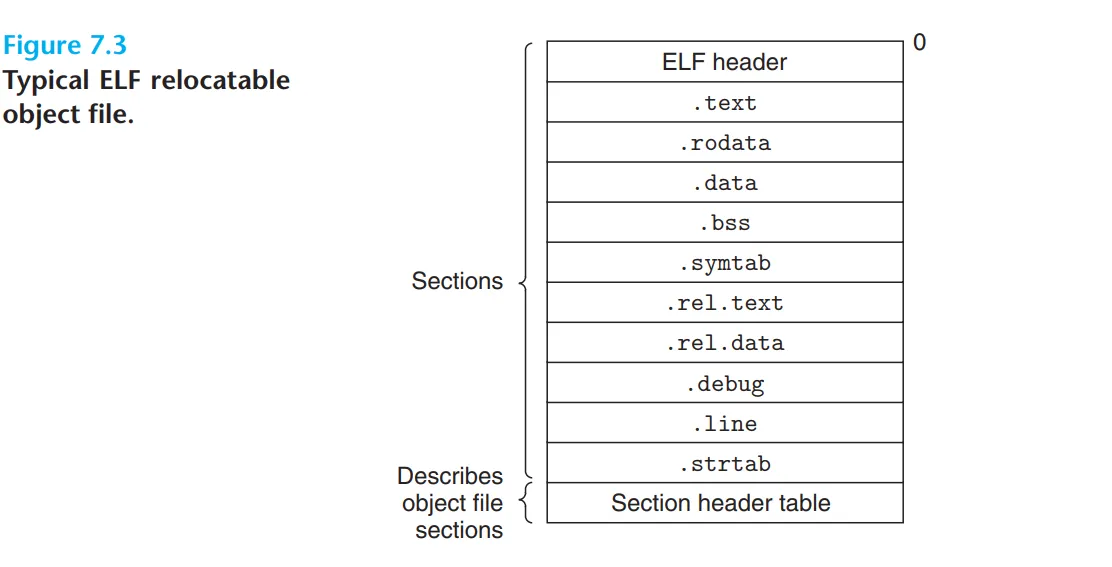
The relevant sections are:
| Section | Usage |
|---|---|
.text | Compiled machine instructions |
.data | Initialized global and static variables |
.bss | Uninitialized global variables (occupies no disk space in the file, only records size; zeroed by the kernel at runtime — more on this in the VM section) |
.symtab | Records all symbols defined and referenced in this .o file |
.rel.text | Records the position and type of symbols in .text that need relocation (see below) |
.rel.data | Records the position and type of symbols in .data that need relocation |
| Section Header Table | Describes the name, size, and file offset of every section — metadata |
With the object file structure in mind, here are the key questions before we dive into linking:
- How does code reference external functions/global variables?
- In assembly, function calls are made through jump addresses — so what address does a call to another file’s function resolve to?
- What does the merged output file’s internal structure look like?
1. Symbol Resolution
The answer to the first question is symbol resolution.
In .symtab, a symbol table records:
- Symbols defined in this file: Functions or global variables that can be used by this file or exposed to others
- Symbols referenced but defined externally: Symbols used in the code but implemented in other source files or third-party libraries (
extern int shared_var; printf)
The goal of symbol resolution is to match every “referenced but undefined” symbol with its “definition” in another .o file’s symbol table.
When the linker processes multiple .o files, it extracts the symbol table from each, building a global symbol table in memory — this will become the .symtab of the final output file.
The global symbol table is built as follows:
Maintain three sets:
    E: Set of object files that will be merged into the executable
    U: Set of unresolved symbols
    D: Set of defined symbols

  Scan each input file:
    1. If it's an object file (.o):
       - Add to E
       - Add defined symbols to D
       - Add unresolved referenced symbols to U

    2. If it's a static library (.a):
       - Iterate through each .o in the library
       - If the .o defines a symbol in U
          * Add this .o to E
          * Update D and U
       - Repeat until U stops changing

Error checking:
  - Multiple definition error (same symbol defined more than once)
  - Undefined symbol error (U is not empty after linking finishes)
Static libraries and multiple definitions are discussed below.
But this raises a problem: what if multiple object files define a variable with the same name? How does the final symbol table record it? This is a symbol conflict — every symbol must have a unique definition.
To handle this, the compiler introduces strong/weak symbol rules:
- Strong symbols: The compiler treats functions and initialized global variables as strong symbols
- Weak symbols: The compiler treats uninitialized global variables as weak symbols
The linker handles name conflicts with a very simple rule:
-
Strong-Strong Conflict: Multiple strong symbols with the same name are not allowed. If two
.ofiles both defineint g_val = 10;, the linker reports:multiple definition of... -
Strong-Weak Coexistence: If one is strong and the other weak, the linker silently picks the strong one and overrides the weak one
-
Weak-Weak Conflict: If all are weak, the linker picks one arbitrarily
This strong/weak mechanism can introduce subtle bugs. For example, you write an uninitialized global double x; (weak) in file1.c, and an initialized int x = 1; (strong) in file2.c. The linker won’t complain — it treats x as an int and allocates 4 bytes. But when file1.c tries to read/write a double (8 bytes) at x, it silently corrupts adjacent memory.
There are mitigation strategies for this, but that’s beyond the scope of this post.
2. Relocation
Once all symbols are matched, the linker begins allocating memory addresses — this is relocation.
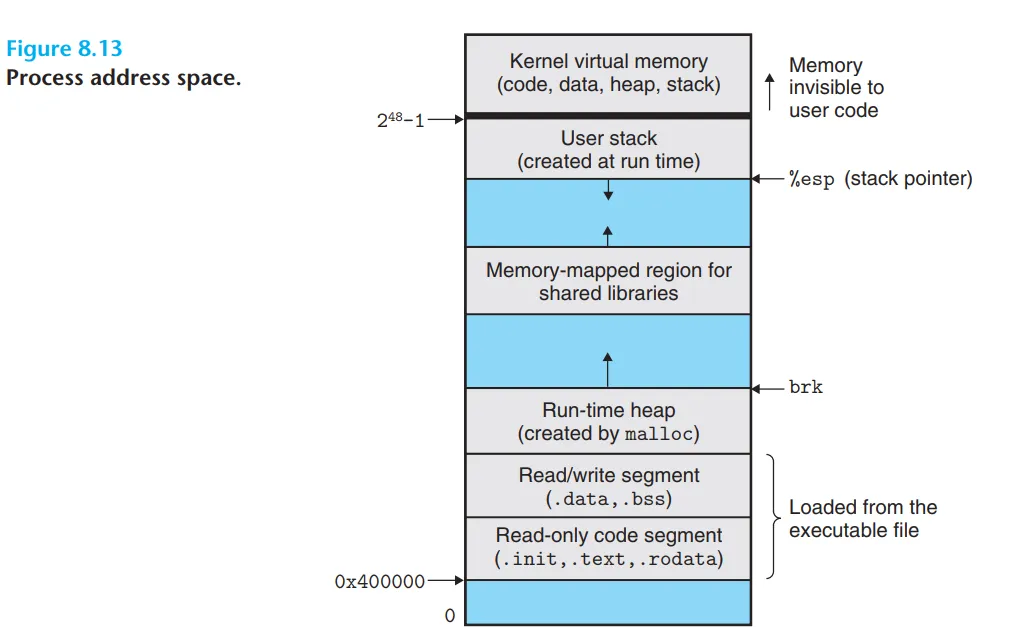
During compilation to .o files, since each file is compiled independently, the assembler has no idea where the machine instructions will end up in the final executable. Therefore, all function and variable addresses in .o files start from 0 — this is one of the conveniences that virtual memory provides for coding.
Relocation happens in two steps:
-
Section Merging: Object files (
.o) contain multiple sections —.textfor machine instructions,.datafor initialized globals, etc. The linker merges all.textsections from every.ointo one giant.textsection, and all.datasections into one giant.datasection. After merging, every function and global variable has a unique and final virtual memory address in the program. -
Fixing Symbol References: With final addresses determined, the linker revisits the relocation table from each
.ofile. The relocation table is like a to-do list: “Note: at offset0x20inmain.o, there’s acallinstruction invoking functionfoo. The assembler filled in0as a placeholder — please replace it withfoo’s real address.” The linker fills in all these placeholders with real absolute addresses (or relative offsets). At this point, every function call and variable access in the program truly comes alive.